Tools · Spreadsheet
GA Estate Inventory and Accounting Workbook
A probate accounting spreadsheet built for Georgia. Schedules, ledger, and return in the common county layout. Priority categories follow O.C.G.A. 53-7-40. The inventory summary pulls from the schedule tabs automatically.
Checkout opens on Gumroad, an outside store. See privacy.
See it
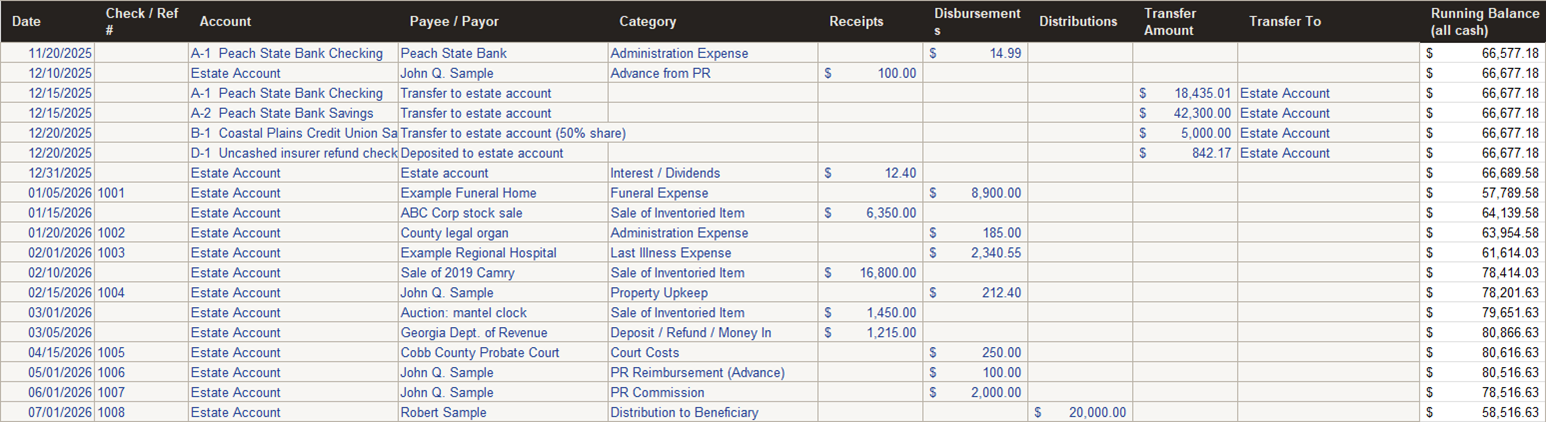
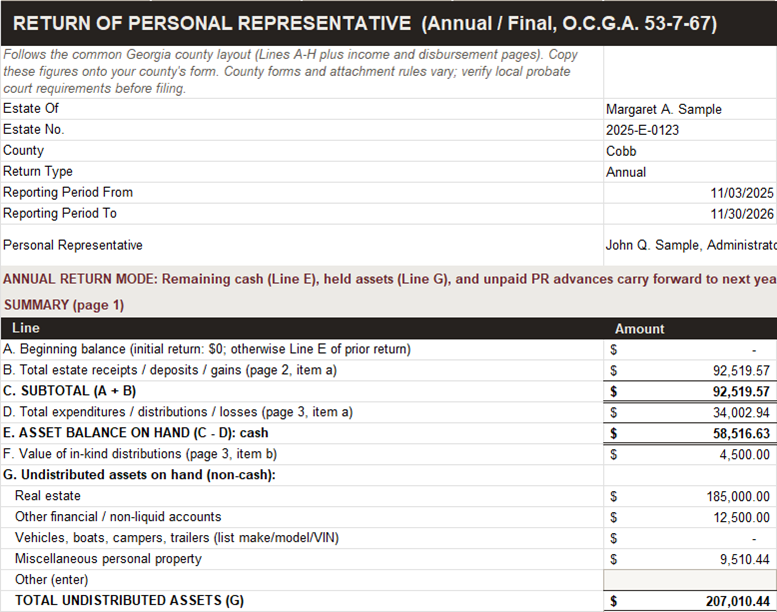
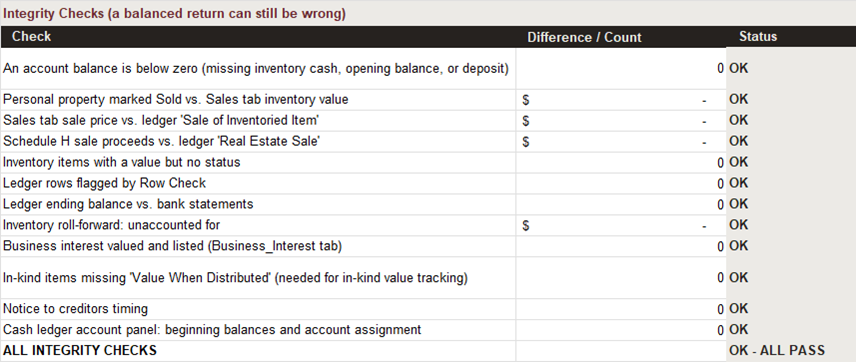
These are from the made-up example (a fictional Georgia estate), included with the workbook.
What it does
- Summary tab. Estate details, key dates, and return type in one place. Georgia deadlines (creditor notice, return due date) are calculated from the dates you enter, and built-in checks show whether the ledger agrees with the bank statements and the schedules. It also estimates the default personal representative commission under O.C.G.A. 53-6-60, for your review.
- Schedules A through H. Bank accounts, joint accounts, securities, cash on hand, vehicles, household property, miscellaneous property, and real property, each at date-of-death value. Each non-cash asset carries a status: held, sold, distributed in kind, or set aside as year's support.
- Inventory. Totals by schedule in the common Georgia county inventory layout (O.C.G.A. 53-7-30), ready to copy onto your county's form. Schedules print as attachments.
- Non-Estate. A list of property passing outside probate, such as payable-on-death accounts and life insurance with a named beneficiary. It is kept for the file and does not feed the inventory, ledger, or return.
- Cash Ledger. All estate cash from date of death, account by account. Accounts fill in from the schedules, moving money into the estate account is a single transfer row, and each disbursement category carries its O.C.G.A. 53-7-40 priority class.
- Return. The common Georgia county layout: Lines A through H plus income and disbursements, for annual and final returns under O.C.G.A. 53-7-67. Totals pull from the ledger and schedules, and a roll-forward shows where every inventory dollar went.
- Claims Priority. Who is paid first when the estate may not cover every debt, grouped by the seven O.C.G.A. 53-7-40 classes.
- Sales vs. Inventory. Each item of personal property sold, compared with its inventory value.
- Business Interest. Works out what a business owned by the decedent was worth at death and where it goes on the inventory.
- Distribution Calculator. Models the residuary beneficiaries' shares. Planning only; it does not feed the return.
- Lists. All 159 Georgia counties and the non-estate and business status choices, in one tab you can edit to fit your practice. Add your own ledger categories too, such as Attorney Fees or Court Costs; each one reports as one of the fixed categories, so the return totals stay correct.
- Year 2 and the final return. Carry the prior return's ending cash forward into a new file. On a final return, the workbook checks that ending cash, undistributed assets, and unpaid advances each reach zero.
What you get
- A blank workbook, ready to set up for your matter.
- The same workbook filled with a made-up example (a fictional Georgia estate), so you can see how the tabs work together first.
- A one-page Quick Start and Rollover Guide: first-return steps, Year 2 carryover steps, and links to Google Sheets copies of both workbooks.
Good to know
- Georgia-specific. The return format and fee schedule follow Georgia law. Procedures and local forms vary by county; check with the court before filing anything.
- Made for desktop Microsoft Excel on Windows. It has not yet been tested on Mac or in Excel for the web. Try the made-up example first and confirm the totals look right before you use it on a real matter.
- The Google Sheets copies are a bonus. Check their totals against the Excel example before relying on them.
- Most tabs are locked so formulas are not typed over by accident; the Cash Ledger tab is left unlocked. The lock has no password and is not a security feature.
- It does the arithmetic. It does not decide whether a transaction is proper, whether the work product is complete, or whether the result is legally sufficient for your court. The attorney and personal representative are responsible for reviewing the work before it is filed or used.
- It is an organizing tool, not tax or accounting advice, and not a substitute for an attorney.
- Your data stays in your file on your computer. Keep your own backup.
- Individual license: one user, one matter. Professional license: firm or practice use, multiple matters. Please do not share or resell the file. See the terms and privacy pages. Refunds are described in the terms.
Checkout opens on Gumroad, an outside store. See privacy.
Also from Exhibit & Ledger: Consolidated Account Reconciliation Workbook, for keeping several accounts in one workbook. See all tools.